Abstract
We present an iterative approach to preparing grant proposals, starting with a brief project summary, then moving to initial budget estimates, scope development, and timeline creation. The chapter stresses that project design is not a straightforward, linear process and advises professionals to revise their budgets, narratives, and objectives several times before submitting the final version. We then offer practical advice on preparing defensible budgets that account for inflation and include both salary and implementation costs throughout the project lifecycle. The chapter includes recommendations for funders to make the proposal process more efficient, promote participatory grant-making, and set realistic timeframes for applicants. Additional resources for ongoing learning in proposal writing and project development are provided.
Iterative Design
The project and proposal development workflow is iterative, like program design and the budget process described in the budget section. In general, we suggest the following workflow to develop projects or a proposal:
Brief. Create a 1-2 page brief with the following sections:
Executive summary. Three to five sentences max outlining the reason for the project, tasks, outcomes, timeline, and high-level budget.
Project goals. Link the project to the programmatic theory of change and goals, then list the project goals/objectives.
Tasks. These could be listed under project objectives and also called interventions or activities.
Budget. Creating a back-of-the-envelope budget helps quickly estimate a project’s basic costs—like staff time, equipment, materials, and key activities, e.g., site assessments, community outreach, training sessions, and report preparation—before investing time in a full proposal. It’s a simple way to test feasibility and guide early planning decisions. Again, don’t worry about details; just make some rough estimates. Napkins (or junk mail) and a pen at a restaurant are good tools of the trade! Capture your proposal ideas and get rolling.
Scope. Draft the proposal narrative or scope of work with a detailed description of tasks and activities by objective, using the brief from step one as a guide. At this point, it is worth adding a GANTT chart as a project timeline to show the workflow and check whether you’ve stacked too many activities at certain times or made your schedule too aggressive.
Nesting goals & objectives
Nest your goals, objectives, and tasks similar to an outline:
Goal 1
A. Objective 1Task 1
B. Objective 2Task 1
Task 2
Goal 2
A. Objective 1
Don’t worry about fleshing out these sections in detail. When drafting the brief, focus on getting the ideas down. The details can be developed later.
Scope
Use the brief to flesh out a more detailed project scope and description. Don’t be afraid to write sections and then rewrite them. Give each section a rest for a few days, then return to it after working on other sections. Create a checklist from the proposal RFP solicitation package to ensure you don’t forget anything. The Forest Business Alliance has a template checklist that may be useful.
Send your proposed ideas to colleagues for review, or develop them across an interdisciplinary team or collaboratively if working with multiple partners.
Budget
Identifying and reviewing a proposal’s requirements and other project parameters early will help focus design efforts and keep expectations aligned with reality. One key parameter is the amount of money available for direct program implementation. Starting with a rough estimate of the required fieldwork will help you make realistic decisions about project scope and scale.
Say you’re developing a $1 mn budget project, dividing it into broad categories using a budget calculator (Table 1). In this simplified example, salaries (35%) include benefits and contracted labor. Implementation (50%) is for all non-salary project costs, such as supplies, equipment, and travel. Indirect (15%) is for an organization’s operating costs, e.g., rent, utilities, and fees. This immediately informs the project team how to allocate resources to the budget and project as they develop the proposal or project.
Table 1:Back-of-the-envelope budget calculator.
Item | Amount |
|---|---|
Salaries | 350,000 |
Implementation | 500,000 |
Indirect | 150,000 |
Total | 1,000,000 |
The calculator will give you rough amounts for each broad category. You could also break it down by your objectives and tasks from step 1 and the rough budget.
Budgeting for inflation
Critical: include inflationary increases in your budget, especially for salaries and material costs that will increase over the project lifetime (at least 4%/yr). If an application only allows one number per item, calculate costs in your budget spreadsheet over the number of years of the project.
Budget process
The project budget is the project’s core engine. Developing it with defensible numbers is critical to project success.
Tasks. Create draft objectives and tasks.
Budget rough draft. Draft a back-of-the-envelope budget by project category or deliverable, roughing out the approximate costs with rules that divide out salary implementation.
Narrative. From the draft tasks and budget, write a proposal narrative.
Timeline. Create a project GANTT chart with deliverables from the budget and narrative.
Refined budget. Return to the budget and refine numbers—test assumptions about estimates for each line item. Increase amounts as necessary. You may need to factor in inflation, salary raises, or increases in material purchase amounts that may fluctuate with changing markets. Adjust the total budget to reflect what you think is a reasonable ask to the funder. This may require lowering some estimates.
Tip
Creating budgets by scratch using a spreadsheet can be tedious, especially when you may need to submit multiple budgets in different formats. If you use Excel, create a table with your budget details. Select the rows/columns in the table, then Styles>Format as Table, and choose the table format colors you like. Here’s an example:
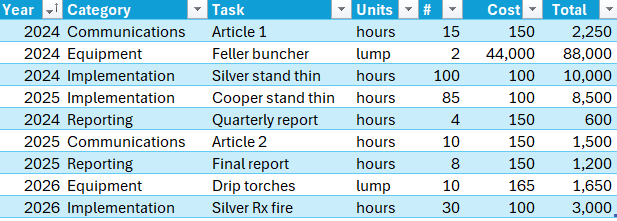
Then, with your cursor in one of the table cells, select Insert>PivotTable>OK. Click in the pivot table report field and, in this case, click and drag Category and Task to the Rows field, Year to the Columns field, and Total to the Σ Values field (with some number formatting and dragging Communications and Reporting to the bottom):
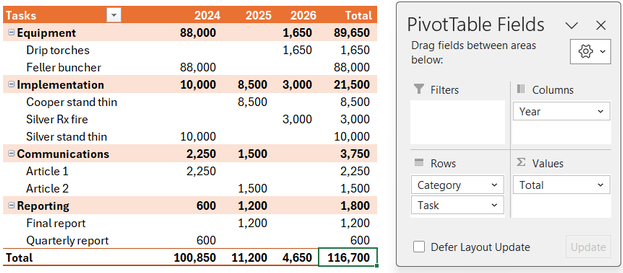
To build out your budget, add more rows to the detail sheet, repeating activities by year. After adding new rows, always click Data>Refresh All to update the summary table(s).
Finalize
Put together your project design and share it. For both proposals and projects, copyedit your final version and then copyedit it again. Look at it in different formats and, ideally, let the proposal rest for a few days, then copyedit again. Printing out the key written components and editing with a red pen can also help catch additional mistakes or grammatical errors. This might seem like a waste of paper, but it can be effective for editing.
Recommendations to Funders
Putting together proposals in response to foundations and government agency requests for proposals (RFPs) can often be an arduous or torturous process. It doesn’t have to be this way, and some foundations and agencies are much better at it than others. For example, the California Wildlife Conservation Board typically requires a site visit before an applicant puts together a proposal; then program officers review submitted proposals and provide feedback on scope and budget. If and when the proposal goes to the board, it’s likely to be funded.
Funders vary so widely that it’s hard to generalize, but the best pay more attention to process and capacity building. If you get a chance to give feedback to funders during a proposal process, please offer them honest feedback. Here are our suggestions for funders that you’re welcome to adapt:
Streamline the initial application process. One page: tasks, budget, qualifications. That’s it! Details later! Don’t make grantees answer 17 questions and develop a 50-page proposal for funding they may have a small chance of securing. That’s not fair to them or reviewers.
Consider participatory grant-making. What if we flattened the decision-making process for who gets funding and included grantees in it? What if grantmaking by all funders was more transparent and less opaque? This might require more upfront time from funders, but it could lead to stronger projects and better connections with grantees.
Rethink proposal forms. Consider providing templates in Word or PDF format that grantees can fill out, then upload the saved docs to your grant portal instead of using online forms that require filling out each section before moving on to the next. No one should have to cut and paste their proposal to submit it online; that is so 1990s. Look for other ways to automate this process with grantees.
Shorten RFPs. RFPs over 20 pages make it hard for grantees to translate them into proposals. List what you want, how much to apply for, and leave the legalese for funding recipients, e.g., don’t include pages of appendices with contracts and required forms. You can link to the legal documentation online, and you can also provide other key documents, e.g., a model budget or scope.
Set realistic due dates. Not January 2, the week after Thanksgiving, or even during the summer school holidays. Also, don’t release RFPs on December 23rd; that’s verging on Ebenezer Scrooge behavior. These due dates aren’t made up; we have experienced this with grants and heard the same from partners.
The FBA can also review projects and proposals, with our staff writers’ years of experience with proposal development and successful funding track records. However, we ask that you send them early, e.g., months before the due date or during the conceptual phase. Please contact us if you’re interested in a review.
Good luck!
Resources
The project design chapter is a very brief look at how to develop projects and proposals. You’ll want to dive deeper to develop your project and proposal craft. Here are a few additional resources to get going:
Forest Business Alliance. Templates, upcoming workshops to prepare you for proposals, and past workshop recordings on various aspects of program, project, and proposal development.
Grammarly. Paying for a better grammar/spell checker (than those available in Word or Docs) may help improve your writing.
Sierra Nevada Conservancy Grant Resources. SNC offers a grants newsletter and regular grant writing workshops. If you’re in the Sierra, contact your local Area Representative to learn more.
North Coast Resource Partnership. NCRP offers technical assistance for proposals and project development and currently offers weekly office hours for real-time assistance. See the no-registration Zoom link on their What’s New page to join.