Abstract
Grant closeout is an underappreciated aspect of grant management, but critical for organizational learning, future funding, and effective organizational/business administration. Building on the January 13, 2026, Grant Closeout workshop, we present a closeout roadmap, identify key insights for closeout financial and outcomes reporting, and discuss ways to leverage closeout with future funding and learning.
Takeaways
Grant closeout is more than just a report; it offers an opportunity for internal learning and external outreach for your business or organization.
Closeout includes complete key processes required by your grant agreement and institution. Start grant closeout well before your grant ends.
For CALFIRE grants, closeout involves both financial and project reports as well as completing forms sent to you by CALFIRE and on eCivis.
Process
It is important to ask two key questions before starting closeout:
Do you need to amend your contract, based on task completion, expenses, or other factors? If yes, see the Amendments callout. If not, move on to the next question.
Are you ready to close out the project? Have you completed the deliverables, spent whatever grant funds you plan to spend, and fulfilled all the contract terms? If yes, read on. Remember: You will not be able to submit further activity reports or complete pending tasks after the grant is closed, and any unspent funds will be de-obligated and returned to the grantor.
Amendments
Amendment procedures differ across funders and sometimes across grant programs within the same agency, yet they almost always take longer than expected. Plan for any adjustments well in advance of your grant closeout date. Additional tips to keep in mind include the following:
Grant manager. Always consult with your grant manager before starting an amendment.
Submittal. For CALFIRE, submit amendments 90 days from the agreement expiration date. For other programs, see the terms in your contract.
Timing. Amendments take time to process. To be safe, you should allow at least 6 weeks from submittal to approval.
Invoicing. Once you submit an amendment, eCivis cannot accept invoices until it is approved.
Cash flow. To avoid cash flow problems, try to time submittal immediately after submitting an invoice.
Grant closeout begins well before your agreement termination date (Figure 1). The hypothetical timeline of approximately three months to complete closeout applies to CALFIRE and other grants, dependent on grant terms.
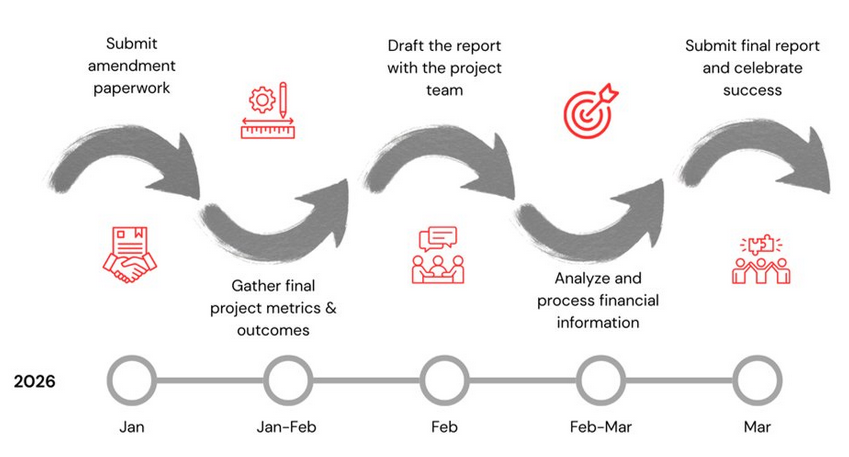
Figure 1:Hypothetical grant closeout process with timeline started three months prior to the grant end.
Once you have determined whether you need to request an amendment and submitted one, start gathering final project metrics & outcomes. Three months ahead of time may seem early, but you may need to track down data, analyze it, and start thinking about ways to visualize it compellingly.
Two months before the grant report is due, draft the report with the project team. Note gaps in information, identify key lessons and things you might change, and treat the report writing as an overall process of learning within your organization. At this time, identify pathways to leverage your grant with other resources (you may actually want to start this process at least a year before the grant ends) and opportunities to use the grant report results to communicate with other audiences.
For example, you may want to tie results from the project into your annual report or a blog post on LinkedIn describing what you learned from the funding and the project. Use this opportunity to consider ways to thank your funder(s) and interact with them to secure further funding (if needed).
One month before the grant ends, analyze and process financial information. Don’t leave this until the last minute, as it takes time, and you don’t want to be combing through a mountain of receipts and other expenses at the last minute. You can always add expenses as you close out, but doing fewer at a time is easier.
Submit the final report and celebrate your team’s success. Note that grant reports may be due sometime following the end of your contract term, but it’s best to submit them as close to possible at this date, given other project priorities, project spending, and other distractions that may cause reports to be submitted later than expected.
Best Practices
Broadly speaking, closeout has a number of best practices that include:
Get organized. Review grant commitments (including project goals), approved budget, and expenditures to date. Create a timeline for finishing the report, including cut-off dates for implementation/expenses and the staff responsible for each item. Gather all relevant documentation on project accomplishments, metrics, photos, and financials.
Analyze. What did you get right, what methods worked/didn’t work, what did you overestimate? What was the project’s impact on the ground and for your organization?
Be transparent. Be constructive and honest in your reporting on what worked and what you would do differently. Think of the take-home results as pluses (what went well) and deltas (what would you change next time).
Visualize. Think of creative ways to visualize and convey your results beyond words in a paragraph (within bounds of agreement and reporting requirements). Graphs, maps, and photos help communicate your message and the project’s accomplishments.
Learn. Spend time reviewing and learning from results. Apply learnings to ongoing projects and measurements to the overall business/organizational plan.
Share. Share your results beyond the report submitted to CALFIRE. Also, the work you do to compile the report can serve multiple purposes, e.g., communications or an annual report.
CALFIRE Closeout
In addition to financial and programmatic reporting, you will need to complete additional materials:
Complete the Project Closeout Report Form provided to you by CALFIRE. Be sure to include allowable supporting materials, such as photographs, news articles, and reports, that demonstrate your project’s accomplishments.
Complete the eCivis portal closeout process. This form in eCivis also serves as your final Financial Report (Figure 2).
Make sure to carefully organize and create backup documentation for the project. Besides having it for your files, once you submit the closeout to eCivis, your project information is no longer accessible.
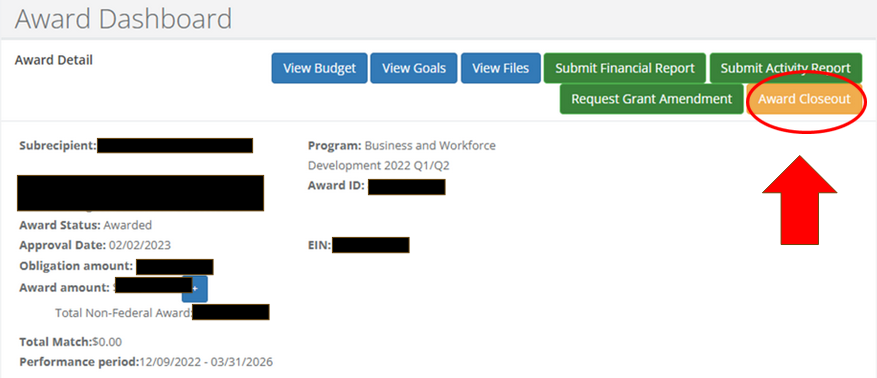
Figure 2:Award dashboard for eCivis showing the award closeout button to start the closeout process.
Resources
Examples of forms and documentation for closeout can be found in the Grant Closeout Workshop on the FBA YouTube channel.
Contact forestbusinessalliance @ gmail dot com if you have any specific questions on closeout, eCivis, or reporting.